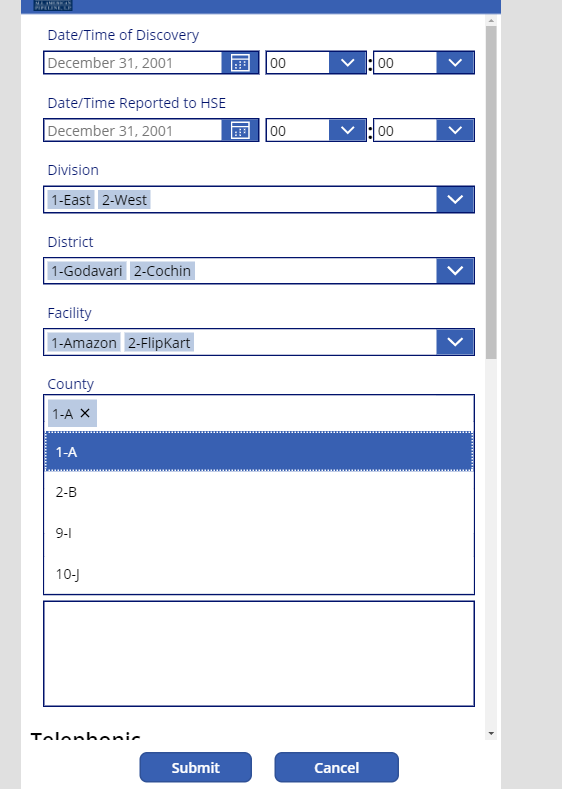
I have one scenario as below List 1: Division List has title field List 2: District List has Title and Division Field(LookUp from Division List) List 3: Facility List has Title, District Field(LookUp field from District List) List 4: County List has Title, Facility Field(LookUp field from Facility List) Main List: Spill Report is the main list Division Field( Look up from Division List) District Field(Look up field from District List) Facility Field(Look up field from Facility List) County Field(Look up field from County List) List Screenshots provided below can be refered for clarification. ----------------------------------------------------------------------------------------------------- PowerApps Canvas Apps In Power Apps Canvas App, We need to first design the app with the 4 respective fields Since those fields are multiselect, then it is to combo box. Generally power apps are not supported for multiselect cascasding dropdown. Refere microsoft documentation, Know Limit...
The patter of calling the methods in SPFx React life cycle are as below Constructor method > ComponetWillMount > render method > ComponentDidMount > any custom methods on either button clicks > ComponentUnmount In React, we just observe render method. But there are other methods which we can go through. Step 1: First, I am creating a blank webpart with react framework. Step 2: Now in tsx file, we are going to create an interface. We are not using the interface which has in components folder .ts file for interface. export interface IReactLifeCycleWPState{ stageTitle: string } Now, we need to extend in the .tsx file HTML part with our new interface we created. We are adding IReactLifeCycleWPState Interface to our default export class as below. export default class Reactlifecyclewebpart extends React.Component<IReactlifecyclewebpartProps, IReactLifeCycleWPState > { Now, we need a constructor in .tsx file. We are using a parameterize...
Articles: Understanding Power Apss https://tejasadventure.blogspot.com/2020/05/power-apps-understanding.html Field Controls https://tejasadventure.blogspot.com/2019/11/power-apps-field-controls.html Cascading dropdown - Power Apps - How to implement https://tejasadventure.blogspot.com/2020/06/cascading-dropdown-power-apps.html Connect to Office 365 Outlook https://tejasadventure.blogspot.com/2019/11/connect-to-office-365-outlook-from.html Expense Tracker App: Steps for implementation https://tejasadventure.blogspot.com/2020/05/monthly-expenses-tracker-canvas-app-in.html Project Management App: Steps for implementation https://tejasadventure.blogspot.com/2020/06/project-management-app.html Power App using Excel data https://tejasadventure.blogspot.com/2019/11/power-app-using-excel-data.html Few Samples and Knowledge sharing https://tejasadventure.blogspot.com/2020/06/power-app-samples.html Create a canvas app from scratch based on Excel data ...


Comments
Post a Comment